

In addition to exporting your search results from the Registered Document State, users in DynaFile can request custom reports. These reports fall into two categories: User Reports and Admin Reports.
Reports added to the User Reports Area are accessible to users with the “View User Level Reports” System Access Right. These reports are often linked to the users actions while Admin Reports tend to report on site wide metrics and data.
Default User Reports
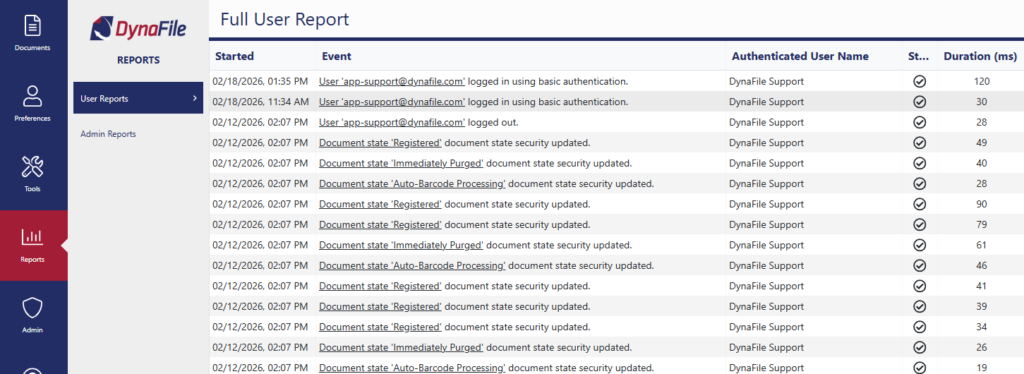
Full User Event Log
- An in-depth record of all events initiated by your account in DynaFile
- helpful for technical troubleshooting
Successful Barcode Processing Log
- Provides a listing of all SUCCESSFUL barcode packets processed during a given date range
Default Admin Reports
Distinct Document Types and Descriptions
- Provides a listing of all unique combinations of Document Types and Descriptions along with the aggregate count of documents with those values assigned.
- This report can be used to map mass Document Type and/or Description updates, please reach out to your account manager or [email protected] for more information.
Document Creation Log
- Lists all documents created for a given date range along with the current state of the document.
Document History Report
- Provides a history of actions taken on a given document. The Document ID can be obtained using the “Document Info” button on the documents grid.
Document Link Creation and Email Log
- Lists all document links created and emails containing attachments or links sent from the system for a given date range.
Document State Access by User
- Lists all document states and which users that have ANY access to the state.
Document Summary
- Aggregated document information

Full Administrative Event Log
- An in-depth record of all the events in DynaFile.
Usage Log
- Lists documents created and user actions for a given date range.
User and Group Index Based Access
- Generates a detailed matrix that lists all user and group access. Best viewed when exported to Excel.
User Security Audit Report
- Provides a detailed analysis of user specific values pertaining to the security of each user accout.
Creating Custom Reports
DynaFile can also create custom reports for your use. Once report parameters and requirements are passed along to your DynaFile Account Manager they can create a case with our engineering group to develop said report(s).
Some examples of common custom reports are:
- Audit reports to determine if a document is missing or present in an employee file.
- Expiration date reports based off an optional Expiration Date that be added to your system; from there you could run a report to see documents expiring in the next 90 days or any other date range.